Hello :) If you mean in THNK-P2P Then there are few things that help in that: 1- Use (Set target tick rate) and reduce the number to something like 15, or just keep reducing it until you are satisfied (the lower the number the less the sync data, and the less the game feel responsive).
2- Avoid syncing every frame.
I already did most of that in the template, but i didn't play with the server tick rate, the default is 20, you can reduce that if you feel the game is lagging.
heu je comprend pas trop car je suis l'ultime noob en matière de programmation😓 pourrais-tu ma faire un schéma plus détaillé ou une mini vidéo (si ça te dérange pas)
Créez un nouvel objet sprite → ajoutez-y votre ressource → double-cliquez sur le groupe d’objets nommé "Walls" → ajoutez votre nouvel objet à l’intérieur de ce groupe → faites glisser votre nouvel objet et déposez-le sur la scène → Terminé !
Salut Vegetato , j'ai acheté ton jeux et vraiment , bravo c'est super réussi👌. Seulement je voudrai rajouter des élément de décors (moteurs , tables , chaises etc.) mais je n'arrive pas a modifier les filtres de collisions🤔.Pourrais tu m'aider? Merci d'avance 😁.
Il suffit de remplacer la ressource InGameMap par une nouvelle, après l'avoir modifiée dans un logiciel de dessin (comme Aseprite).
Ensuite, pour ajouter la collision au nouvel emplacement :
1- Ouvrez votre logiciel de dessin (comme Aseprite) → ouvrez l'image du tileset dans : Dossier Template → Assets → Map → MapsTileset.png
2- Ajoutez votre nouvelle image au tileset, puis enregistrez-la.
3- Ouvrez le logiciel Tiled (utilisé pour créer la Tilemap) → Ouvrez le fichier → Accédez au dossier du modèle → Assets → Map → InGameMap5.tmj → La Tilemap devrait s'ouvrir. Si un élément est corrompu, double-cliquez dessus → puis localisez le Tileset ici :
Dossier du modèle → Assets → Map → MapsTileset.png
4- Dans Tiled, ouvrez l'éditeur de Tileset (il devrait s'ouvrir automatiquement après l'étape 3) → sélectionnez tous les éléments qui recouvrent votre illustration → Dans le menu de gauche, vous trouverez Property → changez la classe en Walls
5- Cliquez sur Fichier → Enregistrer sous → Enregistrez le fichier où vous le souhaitez. Vous devriez obtenir le fichier InGameMap5.tmj.
6- Retournez dans GDevelop et ouvrez le modèle → Scène de jeu → recherchez l'objet MapCollisions → Double-cliquez dessus → Cliquez sur Remplacer et sélectionnez le nouveau fichier InGameMap5.tmj
Et voilà !
Désolé d'avoir rendu la personnalisation des collisions un peu plus complexe, mais j'ai utilisé la collision de la carte de tuiles car elle est ultra-rapide et optimise les performances :)
Another thing I need the fighters extension can you do a discount for me say like maybe 3.97 that’s all I have left if possible i beg I’ll do it through PayPal 3.97 if you insist on the .02$ I can transfer you if you gimme an account I can’t unit the money because in South Africa pay pal doesn’t allow it
Alright I see I saw the wires puzzle where do I find it’s code implementation on what did you list it under for now I just need that please asap can you gimme your WhatsApp or telegram since I’m going to buy more templates & I need you to guide me with the wires template
it's not a bug, it's asking you to fill the Firebase database info in the project properties, please read the First comment in the Main Menu scene, or you can watch this video:
Vegetato by 0:00 today I’m processing payment for this asset the only thing I want from is is the puzzle on the picture the lobby system will be a bonus
So much stuff you can learn from this template, From online multiplayer to Firebase to Public/Private lobbies to Minimap to puzzle games and so much more !
You can learn the public and private lobby using THNK + Firebase from this template, or you can check out Picle Park Template to learn gdevelop built-in lobby system.
Vegetato bro please create 4 puzzle template for me make a variation similar to the one puzzle you have in this amoung us tem in need it in 3 months 3$
Ok can I put this in simple terms can you please sell me the one puzzle you showcased in the amoungt us template for a dollar please the code & it’s asserts just that one puzzle
Sorry, that takes time to edit and clean and remove the reset...etc. for $1 its not worth the time, in the future ill make a more in-depth template for it :)
Ok can I put this in simple terms can you please sell me the one puzzle you showcased in the amoungt us template for a dollar please the code & it’s asserts just that one puzzle
GDevelop supports firebase and will never get removed from it, please explain the problem you are facing :3
If you are getting a firebase error screen when you launch the template project, then that's because you didn't link your firebase database to the project, please watch this video to learn how to do it:
Thanks for your response, the issue that I'm having is that after setting everything up as specified on the documentation (the first 4 comments from the top in the events tab) I am able to host lobbies without getting an error but other players are unable to see the public lobbies. Then if another player wants to join a private one with a code, clicking the join button does nothing. it seems that nothing is writing or reading from firestore.
If you can't see other players public lobbies, then your firebase database is not set correctly:
1- please watch the video i sent again, and make sure you did every single step including the step where we add " " in the firebase config, and when you host a lobby, open your firebase database, you should see a new created document in there, if you see it, it means firebase is working perfectly, and it should be visible in the public lobbies in-game.
NOTE: In the video, when you get to the part where i create a new collection and called it "Leaderboard",here at this part, create a collection and call it "PrivateLobbies" and another collection and call it "PublicLobbies" (so dont create a collection with the name Leaderboard, no need for that one).
2- If Firebase is blocked in your country, try and open a VPN then play the game and see if the problem is gone.
3- Make sure you added the ICE server to the project (the comments at the very top shows you how to do that).
Bro could you please release a 2d puzzles template with quick to solve puzzles like the wires one you have on this extension but make a variety of them
Pretty cool, thanks for this game. A few bugs I noticed: - Even when the impostor kills everyone the end screen is "DEFEAT" for everyone. - When all the tasks are solved nothing happens, no victory screen for the team and defeat for the impostor. - The button Sabotage is just opening the map, should't it do something else? Thanks! Cheers
Sometimes if the connection is slow, it breaks few game mechanics like the defeat mechanic when the impostor kills everyone, or when the tasks are done the game does not finish.
The Sabotage button opens the map for the impostor to click on the areas he wants to cause the damage on (just like the original Among Us gmae).
Hey thanks for the quick reply! I am testing connected to the fiber - not sure why it would not work. Also I m trying to figure out how and where you set up the keyboard configuration I would like to change it for arrows. Do you maybe use Discord?
Sure, you can swap the keys for the arrows: In Lobby scene: Events → Player mechanics → Send message → For PC → Key pressed (& Key released) → Here you can swap the WASD with the arrows (Up/Left/Down/Right).
In Game scene: Events → Player mechanics → Movement controls → Send message → For PC → Key pressed (& Key released) → Here you can swap the WASD with the arrows (Up/Left/Down/Right).
As for the game rules, i will double-check the game again to make sure the rules are working correctly.
I see you are facing problems with multiplayer, let's fix that! Suggestions:
1- Make sure the host window is not minimized, the host is the server, you minimize the host, the server shutdown, so when you test the multiplayer, make sure both the host and the players windows are open side by side (just like in my YouTube Impostor Alert Template video). Note: you can also test the game with your friends.
2- Host a public lobby, and then check your firebase database, did a new ID showed up ? And when the other player open the game, does he see the public lobby in the list ?
3- In MainMenu scene, at the very event at the top, remove the actions (use ICE server) and (Disaple IP sharing), then try the game, we did this to make sure if the problem is caused from metered or not.
why their is no workers in the game is because preview is relatively buggy
Note: I did try this on multiple devices with all maximized pages, and then one with one single maximized page instead. On mobile, the joystick disappears too. Very odd..
When you click Create private lobby, and the host jump into the lobby, check your Firebase database private lobbies collection, and see if a new document is created that includes the short code, and inside of it a long code.
Make sure your Firebase database is built correctly (follow the video I mentioned or the step by step comments). Make sure you added your ICE server correctly (follow the comments i mentioned on how to use one).
For sure ! The template supports PC & Mobile as well ! You can try the template on your mobile anytime ! Even after releasing the game on app store or play store, the multiplayer is fully functional there as well.
Some objects are locked by me to not allow them to move. You can unlock them by doing these steps:
1- Click on this icon to open the instances list 2- In the instances list, you can search/select the object you want to unlock
3- Now you can move the object after it being unlocked.
Notes: This icon mean the object is unlocked and you can move it.
This icon mean the object is locked can't be moved but can be selected.
This icon mean the object is locked, can't be moved and can't be selected.
That's because your game is not linked to a Firebase database, nor ICT server, please follow the step-by-step tutorial I wrote in the comments to fix it. Main menu scene → first 2 comments from top.

← Return to Template
Comments
Log in with itch.io to leave a comment.
Could you tell me where I can find a code to reduce excessive synchronization and prevent lag interruptions?
Hello :)
If you mean in THNK-P2P
Then there are few things that help in that:
1- Use (Set target tick rate) and reduce the number to something like 15, or just keep reducing it until you are satisfied (the lower the number the less the sync data, and the less the game feel responsive).
2- Avoid syncing every frame.
I already did most of that in the template, but i didn't play with the server tick rate, the default is 20, you can reduce that if you feel the game is lagging.
Thank you so much
wow a game THAT is reference
Yes :D
It's a template to anyone wants to make a game like Among Us <3
yeah but your game version template cost money though.
et peut-on modifier les personnage ou les changer complètement
Oui, vous pouvez tout faire :)
Mais lorsque vous modifiez un personnage, vous devez également modifier toutes les animations liées à ce personnage.
je vais essayé ça . Encore merci 😁
heu je comprend pas trop car je suis l'ultime noob en matière de programmation😓 pourrais-tu ma faire un schéma plus détaillé ou une mini vidéo (si ça te dérange pas)
Voici une méthode plus simple :
Créez un nouvel objet sprite → ajoutez-y votre ressource → double-cliquez sur le groupe d’objets nommé "Walls" → ajoutez votre nouvel objet à l’intérieur de ce groupe → faites glisser votre nouvel objet et déposez-le sur la scène → Terminé !
cool merci 😁=
Je voudrai aussi modifier la map de base .est-ce possible ou pas ?
Tout est possible ! :D
Suivez la même méthode que celle mentionnée dans l'autre commentaire :)
Salut Vegetato , j'ai acheté ton jeux et vraiment , bravo c'est super réussi👌. Seulement je voudrai rajouter des élément de décors (moteurs , tables , chaises etc.) mais je n'arrive pas a modifier les filtres de collisions🤔.Pourrais tu m'aider? Merci d'avance 😁.
Merci <3
Il suffit de remplacer la ressource InGameMap par une nouvelle, après l'avoir modifiée dans un logiciel de dessin (comme Aseprite).
Ensuite, pour ajouter la collision au nouvel emplacement :
1- Ouvrez votre logiciel de dessin (comme Aseprite) → ouvrez l'image du tileset dans : Dossier Template → Assets → Map → MapsTileset.png
2- Ajoutez votre nouvelle image au tileset, puis enregistrez-la.
3- Ouvrez le logiciel Tiled (utilisé pour créer la Tilemap) → Ouvrez le fichier → Accédez au dossier du modèle → Assets → Map → InGameMap5.tmj → La Tilemap devrait s'ouvrir. Si un élément est corrompu, double-cliquez dessus → puis localisez le Tileset ici :
Dossier du modèle → Assets → Map → MapsTileset.png
4- Dans Tiled, ouvrez l'éditeur de Tileset (il devrait s'ouvrir automatiquement après l'étape 3) → sélectionnez tous les éléments qui recouvrent votre illustration → Dans le menu de gauche, vous trouverez Property → changez la classe en Walls
5- Cliquez sur Fichier → Enregistrer sous → Enregistrez le fichier où vous le souhaitez. Vous devriez obtenir le fichier InGameMap5.tmj.
6- Retournez dans GDevelop et ouvrez le modèle → Scène de jeu → recherchez l'objet MapCollisions → Double-cliquez dessus → Cliquez sur Remplacer et sélectionnez le nouveau fichier InGameMap5.tmj
Et voilà !
Désolé d'avoir rendu la personnalisation des collisions un peu plus complexe, mais j'ai utilisé la collision de la carte de tuiles car elle est ultra-rapide et optimise les performances :)
Also I see it in an independent see of its own couldn’t the entire UI layout of the wires puzzle be on a layer or external layout
Bro where in the events sheet will I find the wires puzzle I found it on the scene objects but not on the events sheet where is it under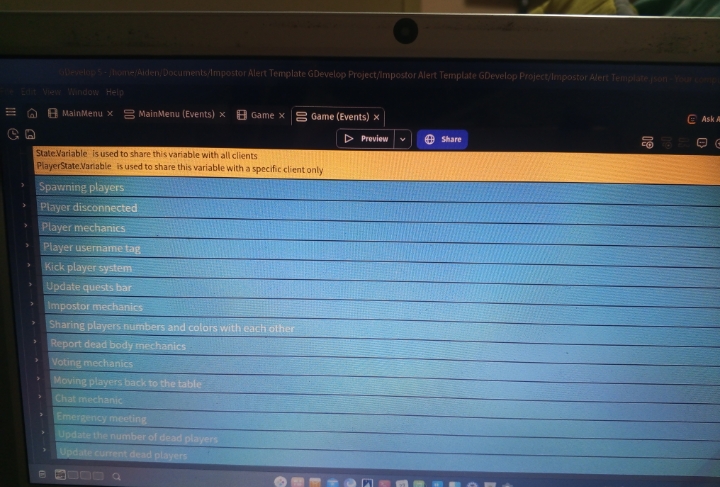
Another thing I need the fighters extension can you do a discount for me say like maybe 3.97 that’s all I have left if possible i beg I’ll do it through PayPal 3.97 if you insist on the .02$ I can transfer you if you gimme an account I can’t unit the money because in South Africa pay pal doesn’t allow it
I have discord but I don’t know how it works it confuse me do you how Facebook or tik Tok maybe we could Dm there
Sorry only on Discord, feel free to DM there :) Cant respond here anymore since you spammed a lot of comments :3
Alright I see I saw the wires puzzle where do I find it’s code implementation on what did you list it under for now I just need that please asap can you gimme your WhatsApp or telegram since I’m going to buy more templates & I need you to guide me with the wires template
Game scene events → Quests → Fix the wires quest.
Make sure to read the comments to understand how it works :)
Feel free to DM on discord: vegetato
Thank you for your purchase <3
it's not a bug, it's asking you to fill the Firebase database info in the project properties, please read the First comment in the Main Menu scene, or you can watch this video:
I bought it I’m looking for that puzzy if it’s not there refund
Vegetato by 0:00 today I’m processing payment for this asset the only thing I want from is is the puzzle on the picture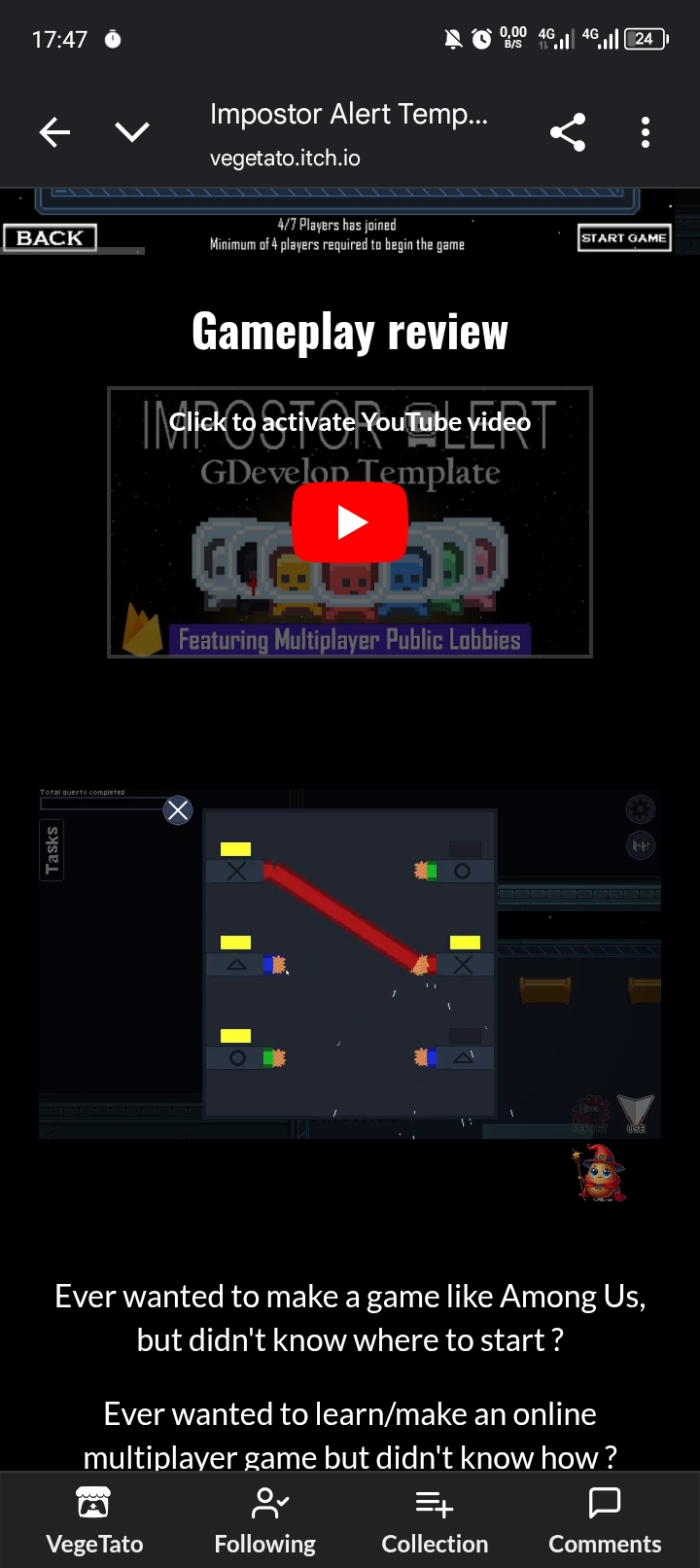 the lobby system will be a bonus
Thank you for your support <3
So much stuff you can learn from this template, From online multiplayer to Firebase to Public/Private lobbies to Minimap to puzzle games and so much more !
Oh & another thing vegetato bro please create a lobby system for me I’ll be making a 3d kids like pub g game I just need lobby intergration
You can learn the public and private lobby using THNK + Firebase from this template, or you can check out Picle Park Template to learn gdevelop built-in lobby system.
This is such a good use of free assets. Bravo!
Thank you <33
Vegetato bro please create 4 puzzle template for me make a variation similar to the one puzzle you have in this amoung us tem in need it in 3 months 3$
Hello :)
Ill keep the template idea in mind for a future template, though there is no demand at all on 4 puzzle game, so It's going to take a long time.
Ok can I put this in simple terms can you please sell me the one puzzle you showcased in the amoungt us template for a dollar please the code & it’s asserts just that one puzzle
Sorry, that takes time to edit and clean and remove the reset...etc. for $1 its not worth the time, in the future ill make a more in-depth template for it :)
Ok can I put this in simple terms can you please sell me the one puzzle you showcased in the amoungt us template for a dollar please the code & it’s asserts just that one puzzle
It seems the firebase extension is no longer available in GDevelop? how is the multiplayer supposed to work without it?
Hello :)
GDevelop supports firebase and will never get removed from it, please explain the problem you are facing :3
If you are getting a firebase error screen when you launch the template project, then that's because you didn't link your firebase database to the project, please watch this video to learn how to do it:
Hey there!!
Thanks for your response, the issue that I'm having is that after setting everything up as specified on the documentation (the first 4 comments from the top in the events tab) I am able to host lobbies without getting an error but other players are unable to see the public lobbies. Then if another player wants to join a private one with a code, clicking the join button does nothing. it seems that nothing is writing or reading from firestore.
Any help would be greatly appreciated!
If you can't see other players public lobbies, then your firebase database is not set correctly:
1- please watch the video i sent again, and make sure you did every single step including the step where we add " " in the firebase config, and when you host a lobby, open your firebase database, you should see a new created document in there, if you see it, it means firebase is working perfectly, and it should be visible in the public lobbies in-game.
NOTE: In the video, when you get to the part where i create a new collection and called it "Leaderboard",here at this part, create a collection and call it "PrivateLobbies" and another collection and call it "PublicLobbies" (so dont create a collection with the name Leaderboard, no need for that one).
2- If Firebase is blocked in your country, try and open a VPN then play the game and see if the problem is gone.
3- Make sure you added the ICE server to the project (the comments at the very top shows you how to do that).
Bro could you please release a 2d puzzles template with quick to solve puzzles like the wires one you have on this extension but make a variety of them
Thank you for the suggestion :)
There is no demand for such template currently, but ill keep it in mind for future template :3
Pretty cool, thanks for this game. A few bugs I noticed:
- Even when the impostor kills everyone the end screen is "DEFEAT" for everyone.
- When all the tasks are solved nothing happens, no victory screen for the team and defeat for the impostor.
- The button Sabotage is just opening the map, should't it do something else?
Thanks! Cheers
Thank you for the feedback <3
Sometimes if the connection is slow, it breaks few game mechanics like the defeat mechanic when the impostor kills everyone, or when the tasks are done the game does not finish.
The Sabotage button opens the map for the impostor to click on the areas he wants to cause the damage on (just like the original Among Us gmae).
Hey thanks for the quick reply! I am testing connected to the fiber - not sure why it would not work. Also I m trying to figure out how and where you set up the keyboard configuration I would like to change it for arrows. Do you maybe use Discord?
Hello :)
Sure, you can swap the keys for the arrows:
In Lobby scene: Events → Player mechanics → Send message → For PC → Key pressed (& Key released) → Here you can swap the WASD with the arrows (Up/Left/Down/Right).
In Game scene: Events → Player mechanics → Movement controls → Send message → For PC → Key pressed (& Key released) → Here you can swap the WASD with the arrows (Up/Left/Down/Right).
As for the game rules, i will double-check the game again to make sure the rules are working correctly.
My discord: vegetato
Feel free to Dm :)
Thanks!
Just added you on Discord :D
I'm having this problem were the multiplayer isn't working,
I double-checked that I have everything set up right, and I do, firebase and metered.
I didn't change the code, so I don't what is going on :(
its exactly
its exactly panhapich's problem but not a firebase problem
very weird
Hello! :)
I see you are facing problems with multiplayer, let's fix that!
Suggestions:
1- Make sure the host window is not minimized, the host is the server, you minimize the host, the server shutdown, so when you test the multiplayer, make sure both the host and the players windows are open side by side (just like in my YouTube Impostor Alert Template video).
Note: you can also test the game with your friends.
2- Host a public lobby, and then check your firebase database, did a new ID showed up ?
And when the other player open the game, does he see the public lobby in the list ?
3- In MainMenu scene, at the very event at the top, remove the actions (use ICE server) and (Disaple IP sharing), then try the game, we did this to make sure if the problem is caused from metered or not.
Hey VegeTato!
So once in the actual game, it wont allow me to move. Is this a bug or server glitch and is their anyway to fix it?
Thanks
Hello :)
You should be able to move normally.
Make sure the Host window is not minimized.
If you still see the problem, please record a video (Creating host → join → start game → show bug) so i can get a deep look at the issue :3
why their is no workers in the game is because preview is relatively buggy
Note: I did try this on multiple devices with all maximized pages, and then one with one single maximized page instead. On mobile, the joystick disappears too. Very odd..
Try again but do not maximize any window, just play in windowed mode on all screens.
Check the movement group events and make sure you didn't change the events that came with the template.
If the template is working fine to you, that means you might have changed the template events, so double check.
There are no workers spawned because the host window was maximized, like i mentioned, try with all windows windowed.
I tried it with all windows windowed, but to no avail.
Very sad :(
never mind i fixed it.
I just needed to add an object that i accidently deleted
Hello :)
When you click Create private lobby, and the host jump into the lobby, check your Firebase database private lobbies collection, and see if a new document is created that includes the short code, and inside of it a long code.
Make sure your Firebase database is built correctly (follow the video I mentioned or the step by step comments).
Make sure you added your ICE server correctly (follow the comments i mentioned on how to use one).
Does multiplayer work well on mobile (IOS, Android)? once released on app store or play store ?
For sure !
The template supports PC & Mobile as well !
You can try the template on your mobile anytime !
Even after releasing the game on app store or play store, the multiplayer is fully functional there as well.
Some objects are locked by me to not allow them to move.
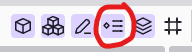



You can unlock them by doing these steps:
1- Click on this icon to open the instances list
2- In the instances list, you can search/select the object you want to unlock
3- Now you can move the object after it being unlocked.
Notes:
This icon mean the object is unlocked and you can move it.
This icon mean the object is locked can't be moved but can be selected.
This icon mean the object is locked, can't be moved and can't be selected.
That's because your game is not linked to a Firebase database, nor ICT server, please follow the step-by-step tutorial I wrote in the comments to fix it.
Main menu scene → first 2 comments from top.
You should add public servers too as now IP is protected
Coming soon 😉
That's very good VegeTato. Great work
Thank you 😊